Showing posts with label Blogger Hacks. Show all posts

1
comments
How to Add Favicon to Blogger - Set Favicon in your Blogspot Blogs

How to Add Favicon to Blogger?, When you create a blog in Blogger, the default favicon you will notice in your browser navigation bar is Bloggers default icon as favicon. If you want to add custom favicon to blogger and set an enrich favicon in your blogspot blogs then this is the final place for you.

Generate favicon in blogger

Now you can set Favicon (Favorite Icon) as you need and which suits to your blog logo and design. Follow the below given steps to add favicon in your blogspot blog with ease.


16
comments
How to Add Advertise Here Banners in Blogger and Attract Advertisers

Advertise here banners is a great way to make money from your blog. There are millions of Advertisers (Sponsors) in the internet market who want to put their ads on the High traffic blogs & Websites. If your blog is getting handsome amount of traffic then you should try to add some Ad slot for the advertisers and you can earn a good amount of money by just selling some ad space. Just Copy HTML Code for Ad banners and put on your blog.

Advertise here banner

Today i was creating the custom Advertise Here banners for my blog. I thought to share it with all my readers so you can easily embed Sponsors Ad Slot in your Blogger Account. Let see how to "Add Advertise Here Banners" in Blogger and Attract Advertisers.


15
comments
Add Best Numbered Page Navigation Widget in Blogger with Scroll Effect

Now Add Best Numbered Page Navigation Widget in Blogger with Scroll Effect using little bit of jQuery and CSS code. To have a Pagination Functionality in blogger can increase your website or blog's page visit counter/user traffic tremendously. Paginator 3000 is a New Page Navigation with Scroll for Blogger.

Blogger Paging Using Paginator3000

While working with this Paginator 3000 widget your can set how many post every Page for your blog you want to display in this pagination. You also can set how Many number will show in Your page Navigation. Below is a guide on how you can add this widget in your blogger blog.


3
comments
Add official Twitter Button in Blogger With Counter and Without Counter

Twitter has just launched an official retweet counter button in collaboration with tweetmeme. This is a very good news for all bloggers who uses twitter to tweet their thoughts on twitter, and if you are running a blog then this new twitter button will allow you to easily share your blog posts and website pages with your followers. The Tweet count button shows how many times the URL has been Tweeted.

Twitter Counter button for blogger

Now You can choose to display or hide the count box, or place it above or next to the Tweet Button with ease. You already have tweetmeme and the tweet counter green buttons as a small widget. I have already posted about Best Social Bookmarking Widget for Blogger which includes slick counter buttons, in that widget one is retweet button with counter. In this post we will learn how to add horizontal, vertical and simple retweet buttons in your blogspot blog.


3
comments
How to Share Google Adsense Revenue in Blogger with Co-Authors

Today we will see How to Share Adsense Revenue for Multiple Authors in Blogger. To have multiple authors in a single blogger blog is very common now a days, and if your blog is having more than one author's then it is quite possible that the co-author wants to put his/her Google Ads code on their own posts.

Share Google Adsense Revenue in Blogger

If you are using wordpress then this is thing can be achieved with Plug-in itself, but in case of blogger you need to do it manually. So below here is a hack for how you can share Google Adsense revenue with multiple authors while using blogger.


14
comments
How to Exclude Adsense Ads From Specific Posts in Blogger

How to show adsense in specific post only?. This is quite a different scenario, if you want to exclude or remove Adsense ads from particular posts in Blogger. I am writing this post specially for my online friend ejaji, he wants solution on How to Exclude Adsense Ads From Specific Posts in Blogger.

Exclude Adsense Ads From Specific Posts in Blogger

Question:

"I have Adsense on my blogger blog. I have put the Adsense code in the template so that the ads show up automatically in every post. However, I need to exclude Adsense on a couple of posts. Is there any way of doing that? I know that, in Wordpress, there are plugins that do just that, but I need the same solution in blogger. Please help fast!"


3
comments
How to Replace "Followers" Title With an Image in Blogger

How many bloggers are there who wants to replace "Followers" Title With an Image in Blogger Siderbar?. Today i received a mail from TheoMat, asking help and hence inspired me to write this post on the topic of how to replace Google Followers title with image in Blogger sidebar.


I have already made a post about How to Replace Sidebar Widget's Title with an Image, but this hack will apply for all the widget's excepting Google provided "Followers" Widget.


1
comments
How to Display Profile Images-Avatar in Blogger Comments

Now you can display profile images or avatar in blogger comments very easily, if you have a profile picture in blogger then whenever you comment on another blog you will see your profile image over there. After formally announced the Blogger Comment avatars you should know that it means you will see the profiles pictures of the commentators near to the comments made. Here is a screen shot for Avatars on Blogger Comments

this is the part that will show up on the main page.

Avatars on Blogger Comments


Now i think you are aware from what we are going to do, so now we will see how Avatars on Blogger Comments can show with little code in no time.


4
comments
How to Add Breadcrumbs in Blogger to Support Easy Page Navigation

Breadcrumbs or breadcrumb is a navigation used in user interface, typically appear horizontally across the top of a web page, usually below title bars or headers in blog area.

Add Breadcrumbs in Blogger

I suggest every blogger who uses blogger as a blogging platform, should add breadcrumbs in blogger to gain SEO Advantage and to support easy page navigation to end users. The term "Breadcrumbs" comes from the trail of breadcrumbs left by Hansel and Gretel in the popular fairytale.


0
comments
How to Add Signature Image at The End of Each Posts in Blogger

This post is for blogspot users who want to attach a signature in their Blogger Blogs. After Receiving an e-mail from one of my blog reader i have posted this article which will guide you through and let you know that How you can add Signature in Blogger like the image given here.

Signature in Blogger

Before Adding the signature you must have an image of your signature of any size, but i suggest you to use small signature image. you can use Microsoft Excel or Word to Create a signature image and save it as .jpg or .png, after having an image you need to upload it to your server.


4
comments
How to Replace Sidebar Widget's Title with an Image

How to replace blogger sidebar widget title with any customize image would be a good hack for so many blogger's. I have noticed that in blogger help forum many of the blogspot users are asking for the help about how they can put an image instead of sidebar title.


suppose you need to put an image Replacing title in your sidebar with image can be very helpful when you want to design your custom design unique blog.


36
comments
Add Bubble Comments Count in Blogger Post Title

Add bubble comments count near your each of you post title can make make your blog more attractive to your visitors. If you are a new blogger in blogging era and want to design your own customize template or modify the existing one, this tutorial is for you. so let's go ahead and add a small bubble comment count in front of your blogger post area. find working demo on this blog :)

Add Bubble Comments Count using CSS in Blogger Post Title
This tutorial will add comments bubble icons to each of your post titles displaying the total count of the comments for that post. You have to add a simple code in your blog Template code, you will be able to see this beautiful in your blog.


3
comments
How To Display XML Code as Plain Text in Blogger

You might have seen HTML code and XML code as plain text on lot of blogspot blogs. If you are running a blog about web development or web design then sometime you may need to display HTML code, CSS code, XML code and javaScript code as well any other code formats on your blogger pages.


Display xml as plain text

Search Terms:

  • How to display XML code on an HTML page.
  • Display XML as text in HTML.
  • Show XML code in HTML.
  • How to display XML code in blogger.
Explanation of the Problem:There may be instances when you want to show sample XML code on a web page. I'm referring to the raw XML code with any and all markup intact.

When the browser believes that the entire page is an XML page (because the page begins with an XML declaration), it will usually do the right thing and display the XML. If, however, you have the XML on an HTML page, the XML markup will be read by the browser instead of displayed.

For example, here is some sample XML data:<?xml version="1.0" encoding="ISO-8859-1"?> <text> <to>John</to> <from>Ed</from> <heading>Note</heading> <body>Hello!</body> </text>

If you put these lines in an HTML page, they will not display correctly because they look like markup code. Without any modification, they will look like this: <?xml version="1.0" encoding="ISO-8859-1"?> John Ed Note Hello!

The fix is pretty simple. Replace all instances of the open bracket and close bracket with their corresponding HTML character entities, e.g. < and >. After doing so, the HTML should look like the following: Show XML as Plain text on HTML Pages
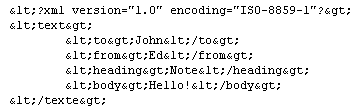
When the above HTML is displayed in a browser, the character entities become brackets and the XML data will display correctly
. If you do a view source on this web page and look at the first block of XML code above, you will see that it displays correctly because it is using character entities!

Below are some resources from where you can get your XML and HTML code modified automatically. just copy the code you want to display and paste it to convert text blocks and get HTML entities (and vice-versa), use any one of the following utilities to convert your code:

  1. Encode / Decode HTML Entities
  2. HTML Entities Converter
  3. HTML Entities encode and decode

Enhancement: Now you already know how to display your xml, html, css, javascript, etc.. as plain text on your blog. Now let's try to decorate the code area in your blog with some CSS tricks.

1. Go to your blogger dashboard and select your blog.
2. Navigate to Layout > Edit HTML.



3. Find this code: ]]></b:skin> and replace it wit this code: code{ background:url("http://i39.tinypic.com/a47lat.jpg") repeat scroll left top #FFFFFF; border:1px solid #99CC66; color:#666666; display:block; font:100%/17px 'Courier New',Fixed,monospace; margin:1em 0; overflow:auto; padding:0 20px 0 30px; text-align:left; } ]]></b:skin>

Red text = You can change this image with your own customized image (Should be 1600 x 1600 in resolution).

You can use below images also as a background, Just replace red text given above with any one of the image address given below :
Display XML Code as Plain Text
plain text in blogger
Display XML Code as Plain Text in Blogger

So try this in your blog now and let me know your feedback on this hack. Best Luck.


^ Scroll to Top